Prosvita v3.46 Release: Template-Based Workspace Creation, Better Parent Communication and Cleaner Scheduling
Prosvita v3.46 continues the direction started in the previous release: Workspace Templates move from configuration groundwork to a real launch workflow for new schools and companies. Administrators no longer get only a template record. They get a path for creating a new workspace with prepared modules, roles and settings.
This release combines two sequential versions, v3.46 and v3.46.1, into one product overview. Together they strengthen everyday operations: faster setup for new environments, clearer parent and authorized pick-up handling, more focused schedules, steadier navigation and less manual cleanup after registration.
For schools and education networks, this is a practical scaling release. Teams can create workspaces from a standard, find family information directly in the student profile, message parents without first adding them as friends, and work with schedules that show only the sections that matter for the selected week.
Key Features for School Administrators, Teachers and Education Networks
Create a New Workspace From a Template
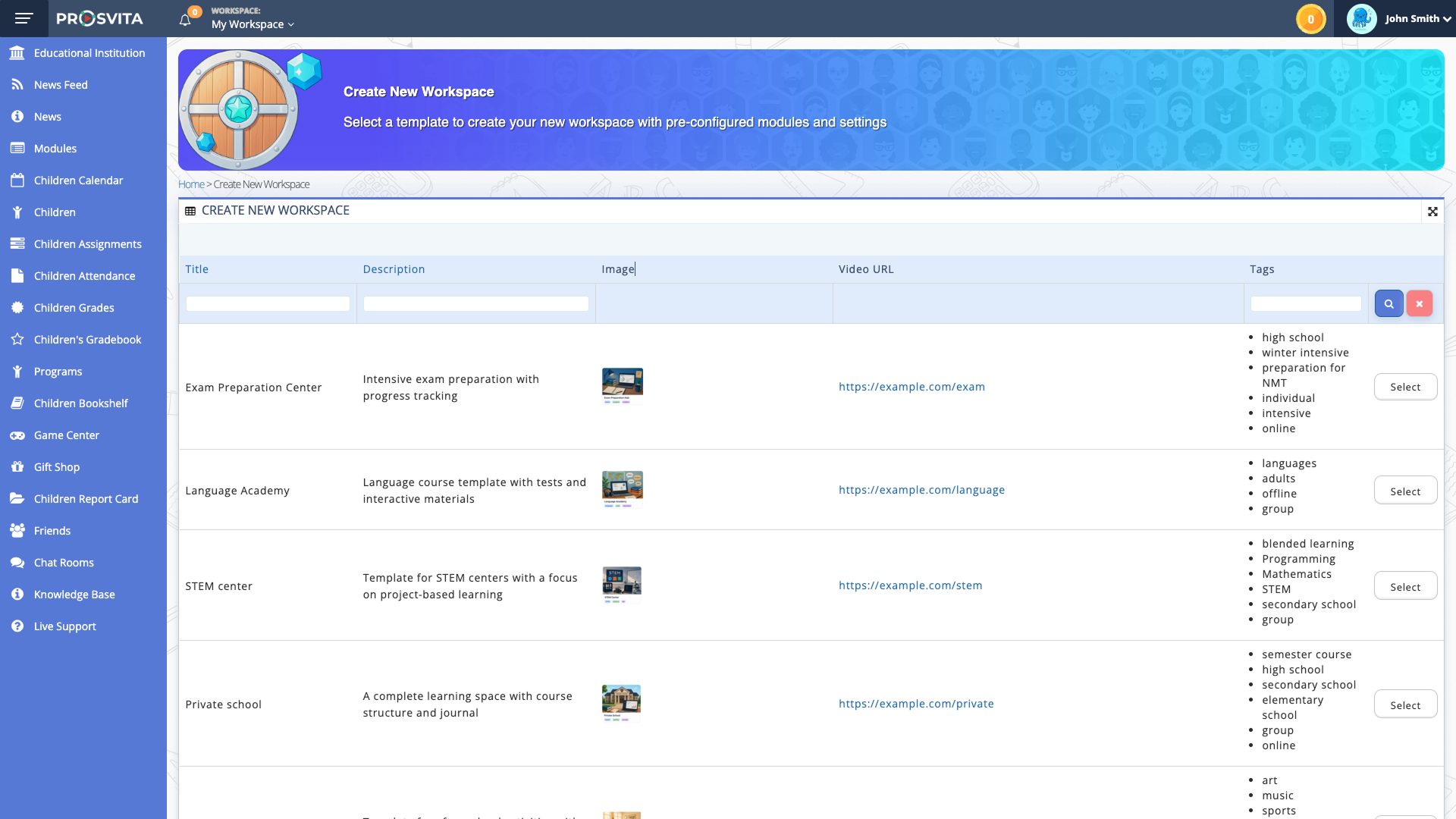
In v3.45 Prosvita introduced the Workspace Template concept. In v3.46 that concept becomes an action: a user with the right permission can create a new workspace from a selected template. The Workspace Switcher gets a "Create New Workspace" entry, followed by a template catalog with title, description, image or icon, tags and optional video.
After a template is selected, the system applies the prepared module list, preloads default settings, creates the default roles and starts workspace creation in the background. That matters for reliability: the user sees a creation-in-progress state, and the new workspace becomes available only after processing is complete.
Use case: An education operator opens a new After-School branch. Instead of manually configuring modules, roles, schedule, journal and communication settings, the administrator opens the Workspace Switcher, chooses the After-School template and starts creation. Shortly after, the new workspace appears in the list with the basic operating structure already in place.
Parent and Authorized Pick-Up Details Inside the Student Profile
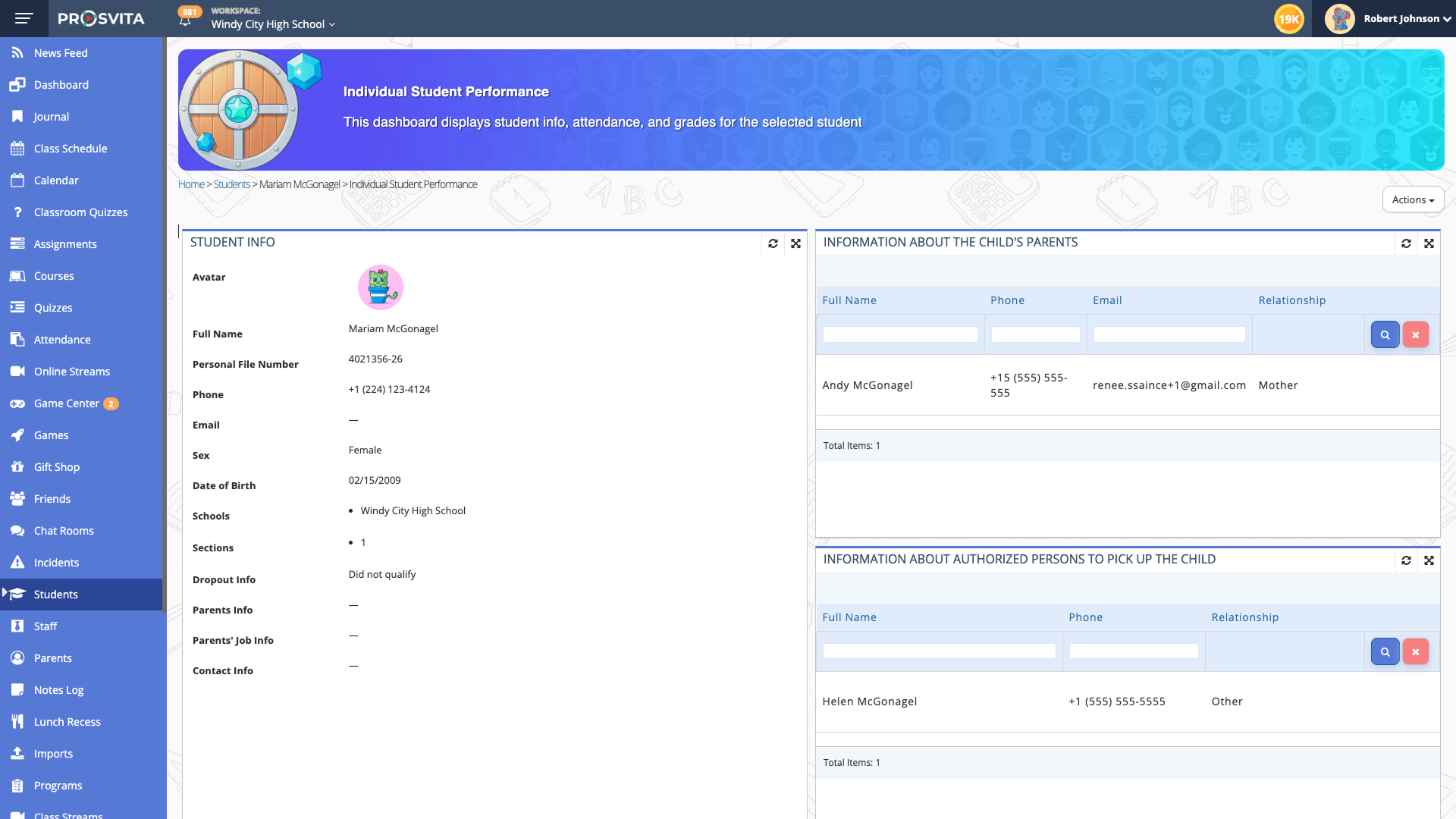
School administrators often need to answer a simple question quickly: who are this student's parents, who is allowed to pick the child up, and which phone number or email should be used? Previously, that could require moving between several sections. In v3.46, the Student Performance Profile gets a dedicated block for parent information and additional authorized pick-up contacts.
The block shows linked parents, full name, phone number, email address and relationship to the student. If there is no data, the interface shows a clear empty state instead of leaving the administrator to guess. v3.46.1 also tightens the model for authorized pick-up contacts: an additional pick-up person can be added without creating a platform user account. The Parents list stays clean and contains only actual Parent-role users, while pick-up contacts remain linked to the student profile.
Use case: A front-desk administrator needs to confirm whether an aunt can pick up a child after class. She opens the student profile, sees the parent and authorized pick-up block, checks the name and phone number without moving to another module, and does not need to create an unnecessary user account for that person.
Redesigned Parent View and Faster Communication
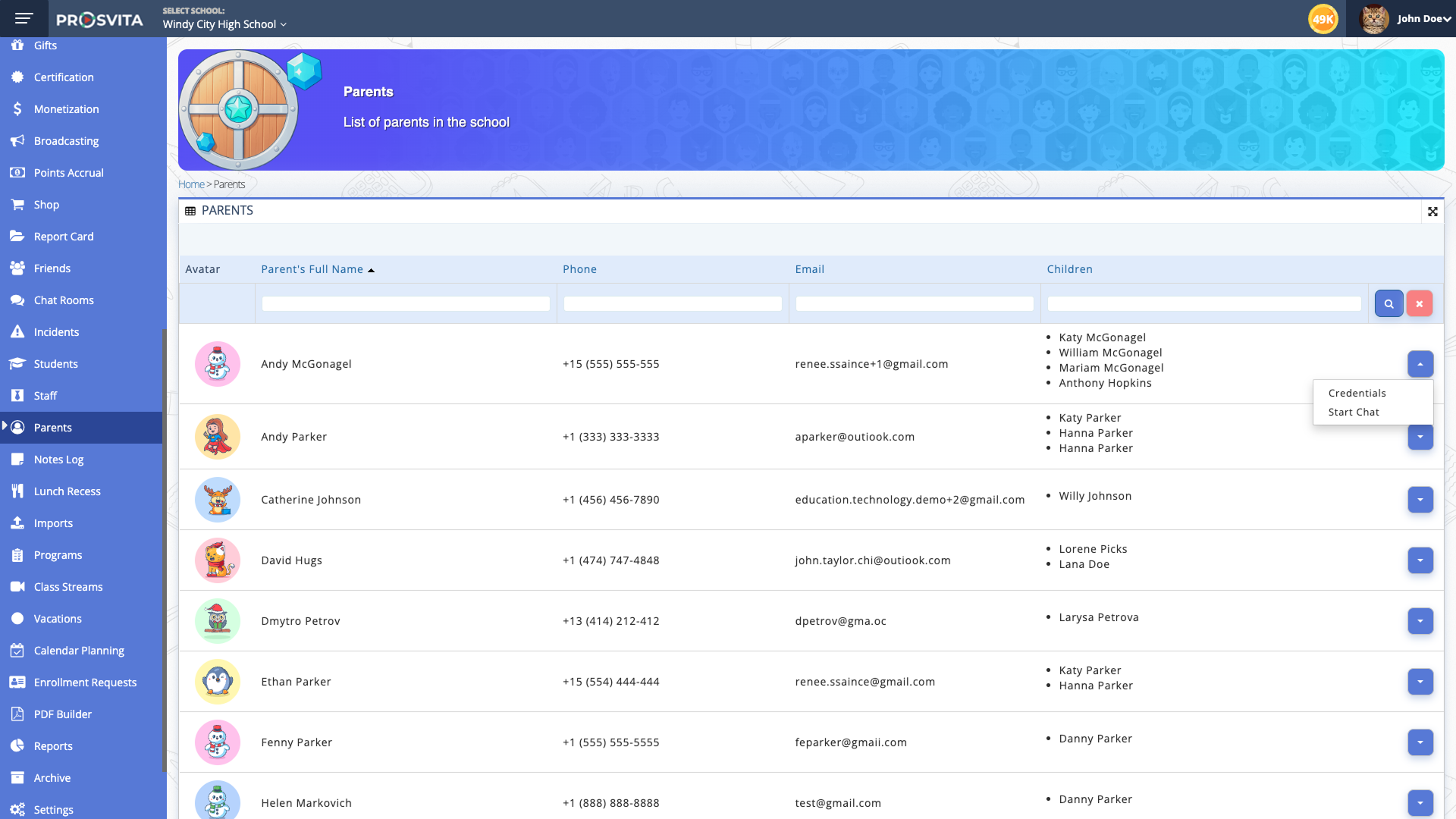
v3.46.1 changes the Parent view logic: Parent becomes the primary entity in the section, while linked children, programs and sections are shown through relationships. That makes the list easier for administrators to understand. Instead of a mixed table with repetitions, the user sees the parent as the central record and can immediately understand which children and programs are connected.
Quick actions for Chat and Credentials are available on the parent record. School communication is also improved: administrators and teachers can message parents in chat even when those parents are not in their Friends list. The chat recipient list now includes both friends and accessible school users.
Use case: A coordinator sees that a student's attendance pattern has changed. She opens the parent record, checks the linked programs and sections, clicks the Chat action and sends a message immediately, with no manual contact search and no pre-step of adding the parent as a friend.
Cleaner Schedules With Less Noise
In large schools and networks, schedules become crowded quickly: many sections appear, some have no classes in the selected week, and administrators or teachers spend time visually filtering empty rows. v3.46 adds an option to show only sections that have classes during the selected week.
By default, the schedule behaves as before and displays all sections. When the new filter is enabled, the interface keeps only active sections with opened or scheduled classes. Combined with fixes for Superschool filters, this makes the schedule more useful for principals, academic leads and teachers working across multiple schools or branches.
Prosvita v3.46 Release Notes
New Features
- Create a new workspace from a template through the Workspace Switcher: select a template, apply default modules, settings and roles, process creation in the background and show the new workspace when processing is complete
- New Parent and Authorized Pick-Up Information block in the Student Performance Profile with name, phone, email and relationship details
- Redesigned Parent view where Parent is the primary entity and children, programs and sections are shown as linked information
- Add an authorized pick-up person without creating a separate platform user account
- Chat communication between administrators, teachers and parents without requiring parents to be added as friends first
- Automatic mapping of date of birth, sex and student ID from registration into the Student Profile
- New schedule filter to show only sections with classes in the selected week
- Logo added for a specific school and its locations
Fixes
- Payment updates from the interface now refresh correctly
- Duplicate student records are prevented more reliably
- The deprecated Programs entry no longer appears beside the active Programs section when program management is enabled
- Student name format no longer changes unexpectedly during editing
- Parent/Guardian Info now validates email uniqueness
- Search in the workspace dropdown works correctly
- Page scrolling is more stable when the sidebar is closed, including touchpad and mobile scenarios
- The banner no longer scrolls over the header on iOS
- Subsidiary-school schedules can see subjects inherited from Superschool
- Student archive flow correctly sets the end date so the Journal reflects the right status
- Grades remain visible to students and parents even when a lesson has no assigned teacher
- School filtering in the Superschool schedule respects selected schools and teachers
- Network of Sections report export no longer redirects users to an error page
Get Started with the New Features
Template-based workspace creation is available to users with permission to create new workspaces. Before rollout, review templates, roles and default module settings. The updated parent views, student contact block, chat improvements and schedule filters are available after the upgrade according to user permissions. Get in touch!
FAQ
Can I create a new school in Prosvita from a ready-made template?
Is the new workspace created instantly after selecting a template?
Where can administrators see parent and authorized pick-up contacts?
Do additional authorized pick-up contacts need user accounts?
What changed in the schedule?