Prosvita v3.44 Release: Multilingual Report Cards, Flexible PDF Templates and Real School Autonomy
A modern school is multilingual by default. One campus operates in Ukrainian, another runs an English-medium program, a third prepares the same documents in parallel for families returning from abroad. A platform that serves these schools cannot be hardcoded to a single language - and it cannot impose one shared catalog of disciplines on every campus. It has to adapt fast, visibly, and without pulling in a developer.
Prosvita v3.44 takes three big steps in that direction: full localization of report cards based on the school's language, a redesigned PDF Template Builder with descriptions and live preview, and a clean shift to a per-school discipline model. Together these changes hand schools real control over how their documentation looks, how their academic structure is organized, and which language each family receives their report in.
The release also modularizes social and gamification features at the user level, adds staff phone-number management, ships a deposit-rewards form for game-world managers, and turns on audit logs for schedule timesheets - plus four targeted fixes that remove a long list of daily friction points for administrators and parents.
Key Features for Schools, Administrators and Teachers
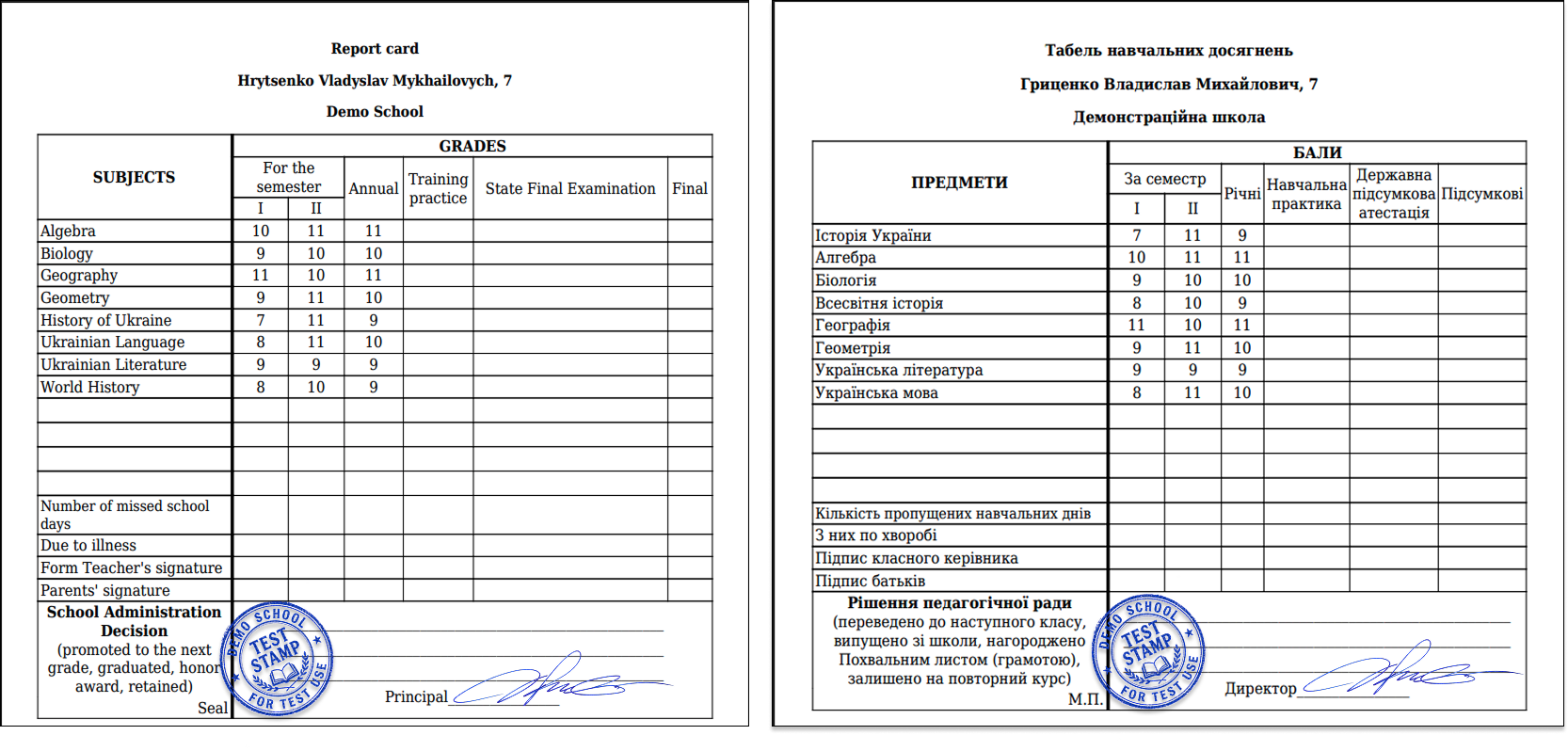
Multilingual Report Cards: Documents in Your School's Language
Until v3.44, report cards in Prosvita were effectively always generated in Ukrainian - even when a school's interface, communications and entire program ran in English, Russian or Kazakh. For schools outside Ukraine, English-medium tracks and multilingual education programs, that meant manual rewrites, parallel templates or confusion for families receiving a document in a language they didn't read.
In v3.44 the report-card language is pulled directly from the school's (or workspace's) language settings. Every section - headers, labels, dynamic fields, summary blocks - is translated consistently. Four system languages are supported out of the box: Ukrainian, English, Russian and Kazakh. No hardcoded Ukrainian text remains anywhere in the rendered document.
Use case: An English-medium school in Kyiv generates end-of-semester report cards. The administrator opens the same "Report Cards" menu they always have - and gets a fully English PDF without any extra setup. A Ukrainian-medium school next door produces the same report in Ukrainian with one click.
Redesigned PDF Template Builder: Description, Live Preview, In-Place Editing
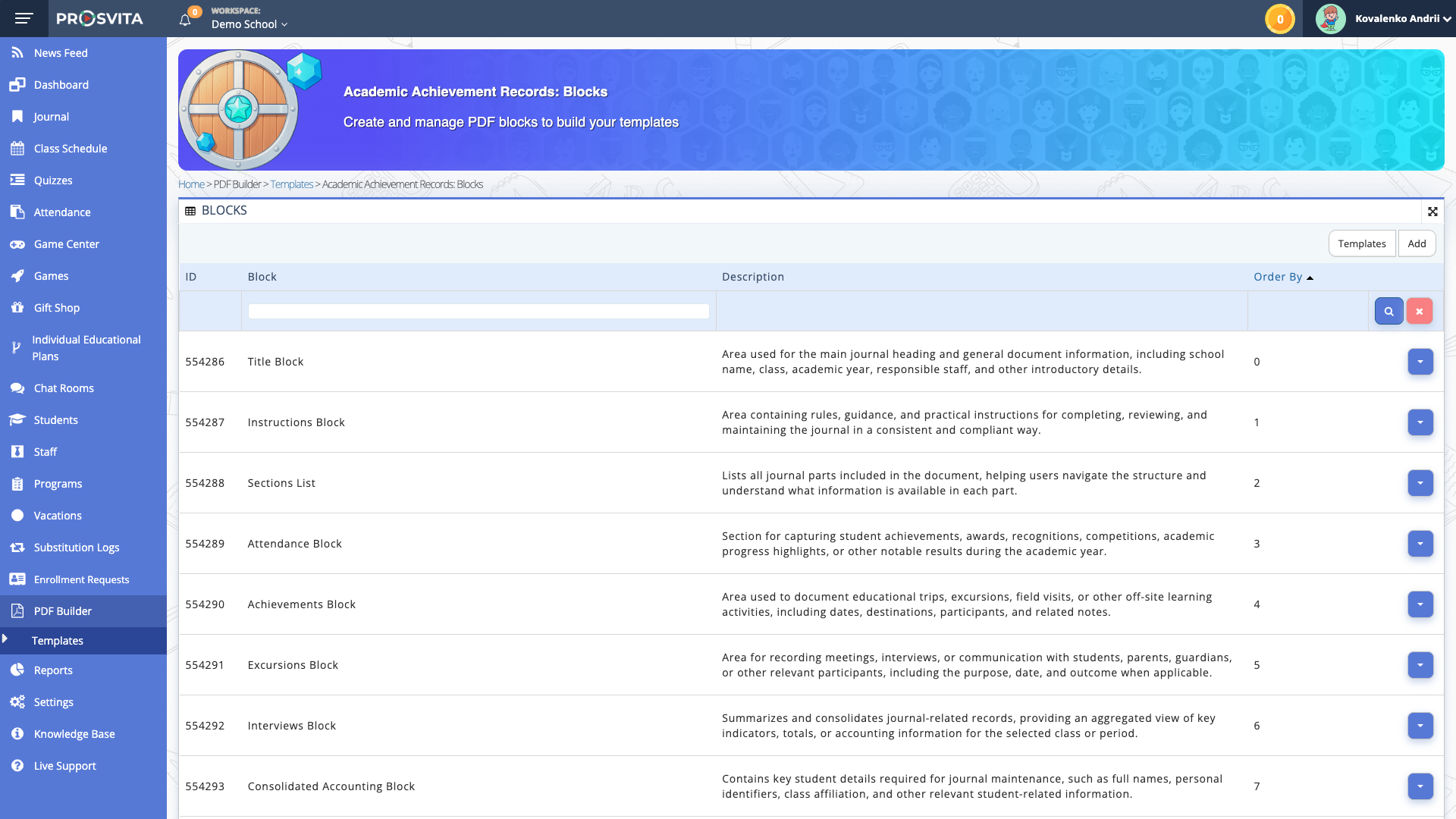
A document template isn't just markup. It carries knowledge: which data it uses, who it's for, how it should be applied. In earlier versions that knowledge lived only in the heads of the administrators who built it - and it disappeared the moment someone new took over.
Prosvita v3.44 reworks the PDF Template Builder end to end. A guide block at the top of the page now explains what the builder is and how to use it. Every template has its own editable description field, where you can document its purpose, its data sources and any conventions tied to it. A real-time preview shows you how the template renders against actual data before you push it into production. And - most importantly - templates can now be edited directly inside the Builder, both CSS and HTML, with no need to download a file and upload it back.
For super-admins and school admins, that means a faster "change → see → apply" loop, transparent documentation living inside the tool itself, and a much lower barrier to entry for new staff.
Use case: A school administrator gets a request from the principal: add the school logo to the attendance report and rework the summary block. They open the PDF Template Builder, find the "Attendance Report" template, read its description, experiment with the layout in the live preview - and apply the change in five minutes.
Disciplines per School: The End of the Shared Catalog
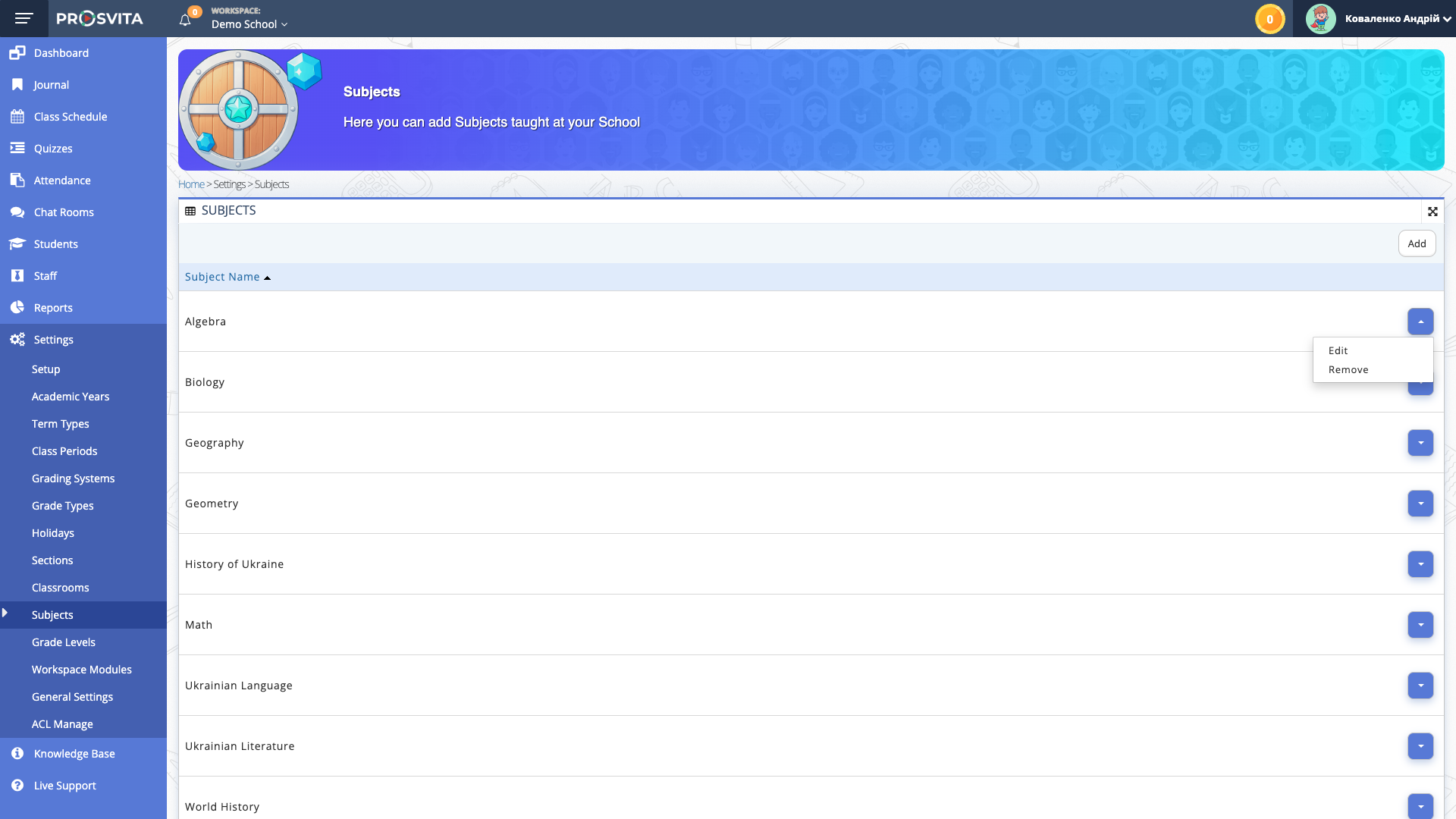
Until now, every school in Prosvita shared one centralized catalog of disciplines. It looked clean architecturally - until schools started adding their own specialized subjects, renaming generic ones or removing entries that didn't apply to them. A change in one school could ripple across dozens of others.
In v3.44 the architecture changes for good: every school gets its own isolated discipline table. Subjects added by one school don't appear in another school's lists. A new menu entry under Settings → Subjects (Configure Disciplines) gives the school administrator full control over their campus's discipline catalog - without risk to neighbors and without involving a developer.
Use case: A specialized language lyceum adds "Classical Latin" - a subject no other school in the system offers. The administrator opens Settings → Subjects, adds the discipline - and it appears only in their school, in their schedule and in their reports. Every other school carries on exactly as before.
Social and Game Features as User Modules
Some schools lean heavily on gamification and social features to motivate students; others deliberately keep the environment minimal. In v3.44 Prosvita moves Friends, Gift Shop and Game into the User Modules system - a structure separate from school-level modules that lets these components be enabled or disabled per individual user. The "parent + school administration + program" enrollment workflow has been rebuilt so that access to these modules is granted or revoked automatically, based on program policy and the relevant approvals.
This removes the gray zone where a school formally didn't offer gamification but students still saw social elements in the interface - and conversely makes it easy to switch the modules on for programs where they belong.
Use case: A student transfers from the "Basic" program to the "Extended" program, which includes full access to the game center. The administrator confirms the transfer - and the Friends, Gift Shop and Game modules show up in the student's interface automatically, with no extra ticket to support.
Prosvita v3.44 Release Notes
New Features
- Multilingual report-card generation driven by school or workspace language - Ukrainian, English, Russian and Kazakh supported, no hardcoded Ukrainian text in the rendered document
- Redesigned PDF Template Builder: top-of-page guide block, per-template description field, live preview against real data, direct CSS and HTML editing inside the Builder
- Discipline reorganization: each school owns an isolated discipline catalog; new Settings → Subjects (Configure Disciplines) menu entry
- Friends, Gift Shop and Game moved into User Modules, with module access automatically granted or revoked based on program enrollment and administration approvals
- Administrators can add and edit a phone number for every staff member in the school workspace (including the aggregated Superschool list); staff can update their own number from profile settings; phone format is validated
- Deposit rewards form for users: pick user categories, fill NWR fields, optional force checkbox to overwrite existing values - built for bulk-distributing rewards by group and criteria
- Audit logs for schedule timesheets: full visibility into who changed what and when, for investigations and historical reconstruction
Fixes
- The IEP Students Plans page no longer shows grade levels from other schools where the student has sections - the list is now scoped to the current school administrator
- Quests, Assets and Achievements with no translation in the user's language no longer render as empty content - a language fallback now shows the available version
- The Start Date field in the Scheduler is now editable when updating scheduling parameters
- Manually created After-School parents linked to an assigned child can now successfully add programs through the Add Program button - the error blocking the operation has been resolved
Get Started with the New Features
Every feature in Prosvita v3.44 is already live in your workspace - updates roll out automatically. Check your school's language in settings, open the redesigned PDF Template Builder, or head to Settings → Subjects to set up your campus's own discipline catalog today. Leave a request!
FAQ
What language are report cards generated in starting from Prosvita v3.44?
Can I edit a PDF report template directly inside Prosvita without downloading the file?
How can each school have its own list of disciplines in Prosvita?
How does a school administrator add or update a staff member's phone number?
What are deposit rewards in Prosvita v3.44 and who needs them?